Customers purchase parking time at a pay-station or by using a mobile app.
Purchase time is tied to your license plate. An electronic receipt can be sent via text message or email. Payment is required, even if the closest pay-station is broken or app is not working. Please go to a nearby pay-station or use another mobile app to pay. Payment is required in City of Hood River Pay to Park spaces Monday-Saturday, from 8am-6pm, excluding federal holidays.
PAY STATION
Please see map for pay-station locations.
PARKING APPS


It is very important to review all your parking details before purchasing your time. Parking session cannot be adjusted once confirmed. If Parking Enforcement Officers are not able to match the license plate on your vehicle with the transaction data, you will receive a citation.
After you purchase a parking session you can move spaces within downtown pay to park area. At short-term meters, it is unlawful to extend the parking time beyond the designated limit for parking in the metered space.
How do I use a Pay-station?
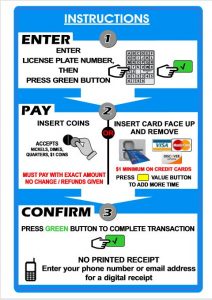
How do I enter my license plate?
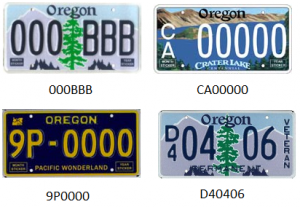
Use the keypad on the pay-station to enter your license plate including the stacked characters [alphanumeric only, no special characters]. See examples below:
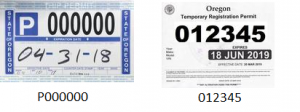
You need a Temporary Registration Permit or a Trip Permit to allow you to temporarily use an unregistered vehicle on Oregon roads. Please enter the permit number as shown below, including letters and numbers. Do not use the VIN number.
Vehicle Trip/Temporary Permit number to enter
TO REPORT A BROKEN PAY-STATION
To report a broken pay-station, please call (541)386-1488 press option for Parking.